Pro IDX + CRM : View Email Activity of an IDX or CRM Lead

Updated Wednesday, April 01, 2026

IDX / CRM Email Frequency

Email alerts are sent twice a day, if there are new or updated listings that match the saved search criteria.

Open House Reports are sent weekly if there are open homes that match the saved criteria.

Market Reports are sent monthly.
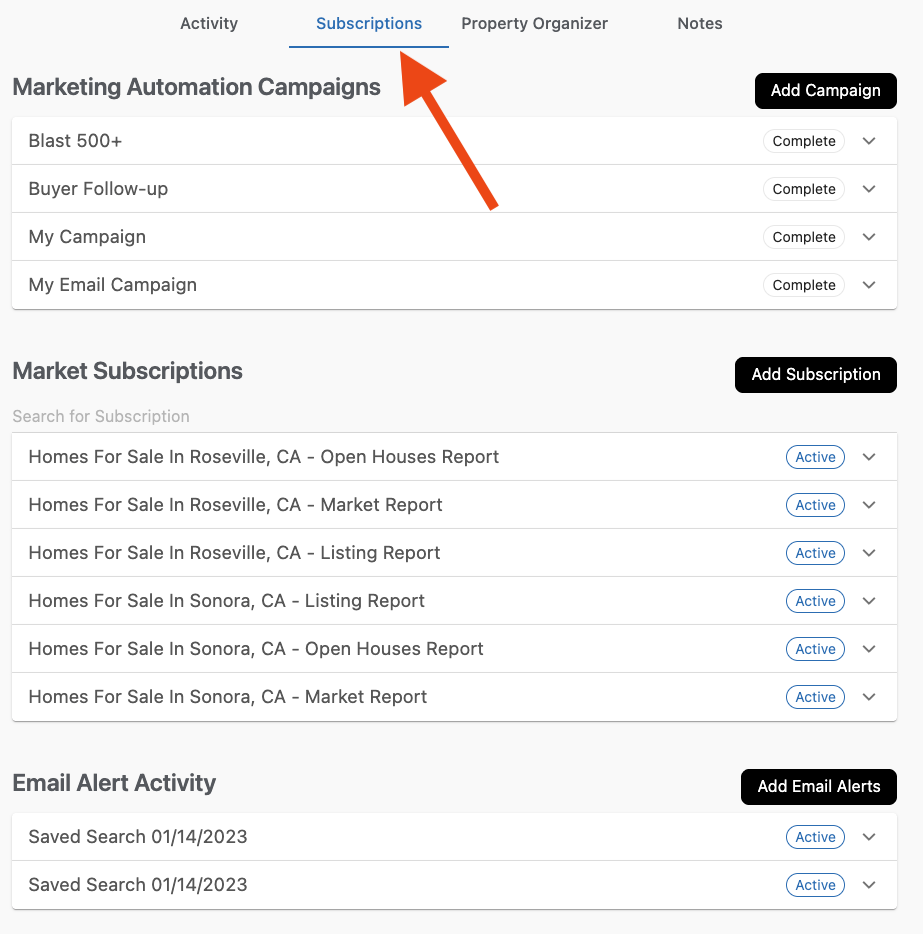
To View Email Activity:

  1. Go to Control Panel > IDX > CRM > Lead List (or Control Panel > IDX > Leads > Lead List) and click a lead's name.
  2. On the lead profile page, click the Subscriptions tab.

     
  3. Click the items in each section to expand them, and see when emails were sent, if they were opened, and if they were clicked.
    You can also add and deactivate campaigns, subscriptions, and email alerts here.
    Note that some data in this section is only displayed for the last 30 days.

Need Help With This? Contact Us!


20+ YEARS OF QUALITY SERVICE WITH A SMILE

@ 2026 AgentWebsite  Terms of Use | Privacy | Proud member of East TN REALTORS®
