Free IDX : Flex MLS: Activate Free IDX Property Search

Updated Tuesday, February 17, 2026

For Flex MLS users only:

Follow the instructions below to activate the free IDX property search on your webite.

If you need help with the steps below, contact your Realtor Association's MLS support line.
  1. Log in to FlexMLS.
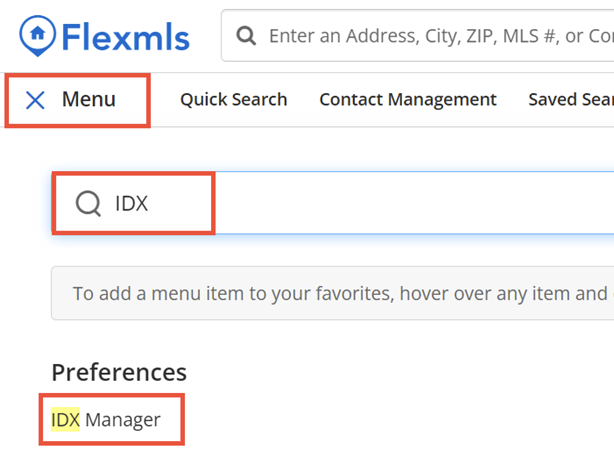
  2. Go to Menu. Enter "IDX" in the box.
  3. Click IDX Manager below Preferences.
  4. Scroll to the bottom of the page and click Retrieve IDX Lite Link.
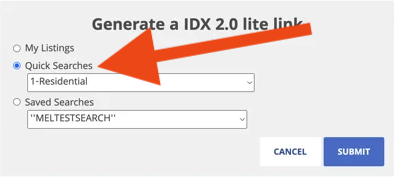
  5. Select Quick Searches. Then choose the search you want to place on your website.
  6. Click Submit.
  7. Your IDX LITE Link will be displayed in a box. 
  8. Copy the link and email it to support.
  9. When we receive your email with the link, we will activate the free IDX search on your website.

Need Help With This? Contact Us!


20+ YEARS OF QUALITY SERVICE WITH A SMILE

@ 2026 AgentWebsite  Terms of Use | Privacy | Proud member of LIBOR