Your Website : Update Website Header Photos and Text

Updated more than a week ago

The top area of your website is called the header.

To add or change header slides (photos), or change header text, follow the steps below:
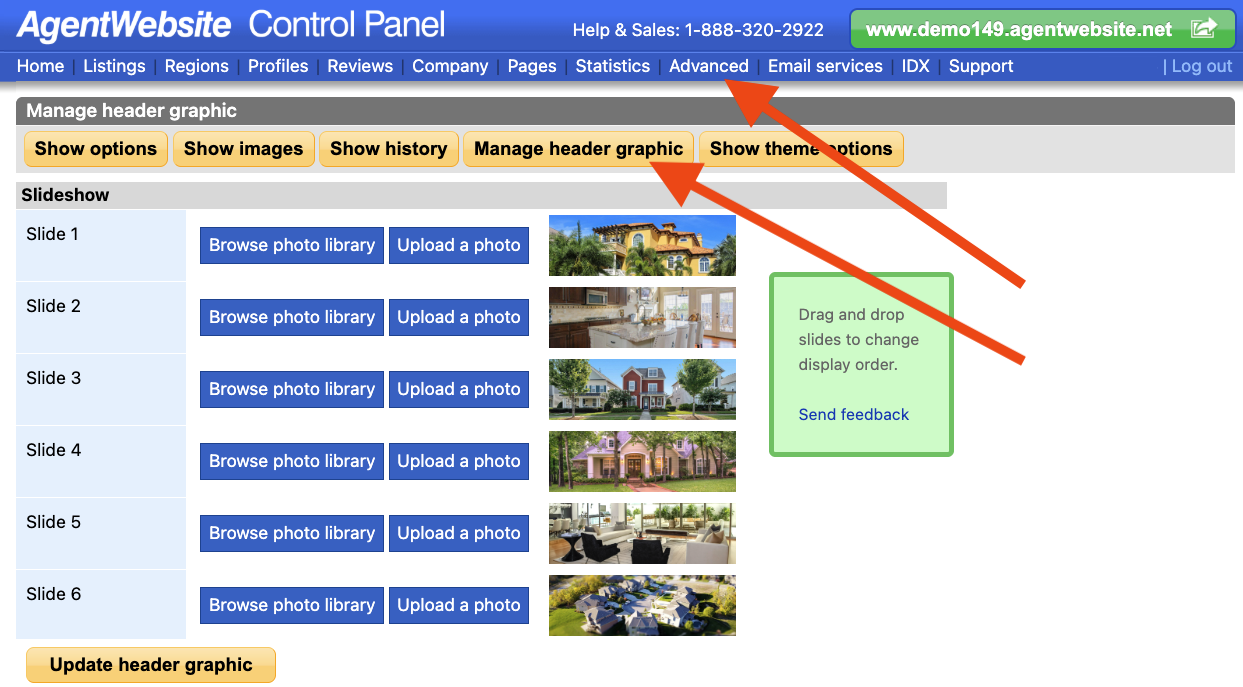
  1. Open the AgentWebsite Control Panel.
  2. Click Advanced at the top.
  3. Click Manage header graphic. Here you can:

    • Drag and drop slides to change the slideshow order.
    • Click Browse photo library to choose from existing images.
    • Click Upload a photo to add a new photo from your computer.
    • Scroll down to change header text.

Tip: The logo in the header graphic can also be updated. Click here to learn how.


Need Help With This? Contact Us!


20+ YEARS OF QUALITY SERVICE WITH A SMILE

@ 2026 AgentWebsite  Website Terms | Service Terms | Privacy Policy
