Getting Started : Change Your IDX Password

Updated more than a week ago

Follow the instructions below to change your IDX password.
Use this password to log in when you get leads by email or text, or to access the Max For Real Estate Mobile App.
  1. Log in to the AgentWebsite Control Panel. (learn how)
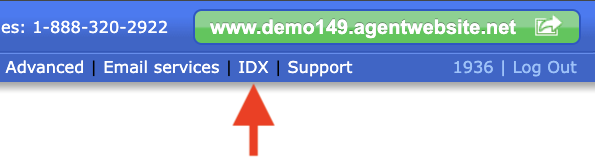
  2. Click IDX at the top.
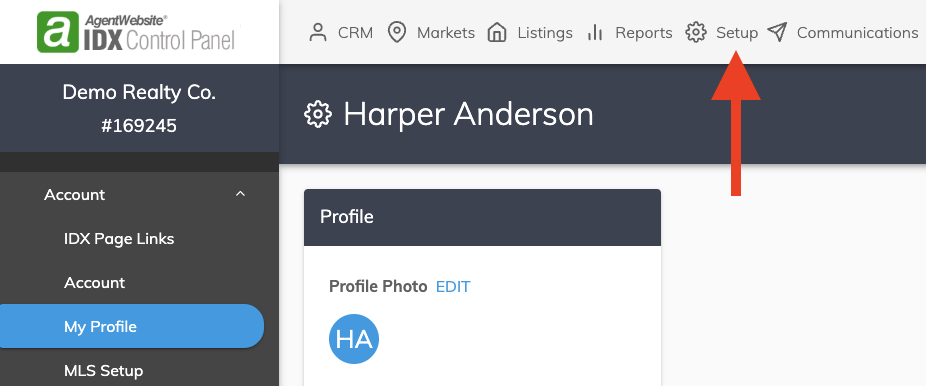
  3. The IDX Control Panel will open in a new tab. Click Setup at the top. Your profile will be displayed.


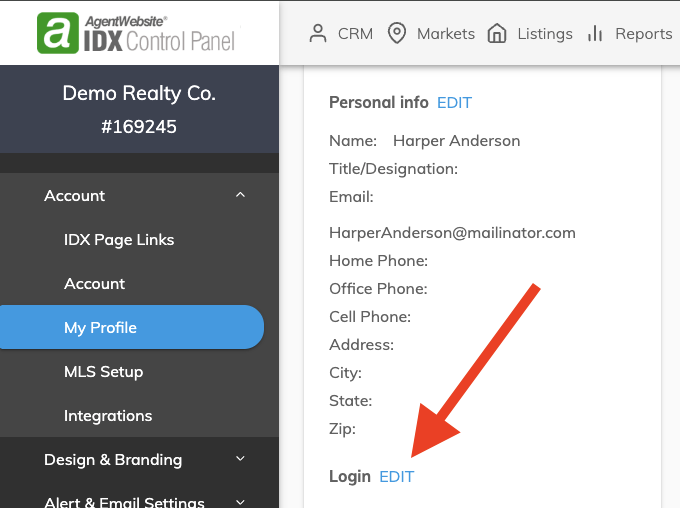
  4. Your profile will be displayed. Scroll down and click EDIT next to Login. The 
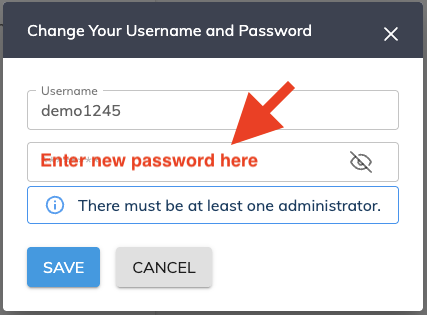
  5. Enter your new password, then click SAVE. Make sure the password is unique. Do not reuse passwords.
  6. Congratulations! You have changed your IDX password.


Need Help With This? Contact Us!


20+ YEARS OF QUALITY SERVICE WITH A SMILE

@ 2026 AgentWebsite  Terms of Use | Privacy